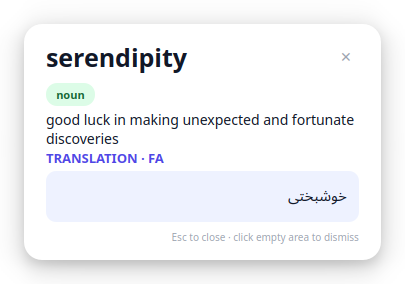
dicio is a beautiful popup dictionary for Linux. It lives in your tray, watches the text you select — in a PDF, browser, terminal or editor — and shows a modern card with definitions from multiple dictionaries, phonetics, audio, synonyms, translation and a picture.
WordNet, Wiktionary, Free Dictionary and Urban Dictionary merged into one scrollable card — with a source picker to filter.
Bundled WordNet gives an instant definition with zero network, then online dictionaries enrich the same card in the background.
IPA phonetics, a pronunciation audio button, and text-to-speech (offline espeak or online).
An illustrative picture for the word loads automatically, so you build a visual memory.
Choose the definition that clicks for you — dicio remembers it and shows it first next time.
Clickable chips to explore related words. Click one to look it up instantly.
Translate any word into your preferred language (fa, de, es, ru, and many more).
X11 PRIMARY selection — select text in any application. Light and dark themes included.
Princeton-style lexical database, bundled offline.
● works offlineOxford/CC-derived definitions with IPA and audio.
Community-maintained definitions, etymology, IPA.
Slang and colloquial usage.
Highlight any English word in any app — a PDF, browser, terminal, editor, chat.
A sleek card pops up next to your cursor in about 120 ms.
Read definitions from multiple dictionaries, listen, see a picture, and pick your favourite definition.
curl -fsSL https://dicio-a8g.pages.dev/install.sh | bashdicioRequires Python 3.9+, an X11/XWayland session, and ~20 MB of disk for the offline dictionary. Alternatives: clone the repo and run ./install.sh.